 Kept Texts
How to Print Text Messages for Court
Turn the conversation into one PDF that shows who sent each text and when, both sides, in order and numbered, then print it or send it to your lawyer. On an iPhone, Kept Texts makes that PDF without a computer, and nothing is uploaded.
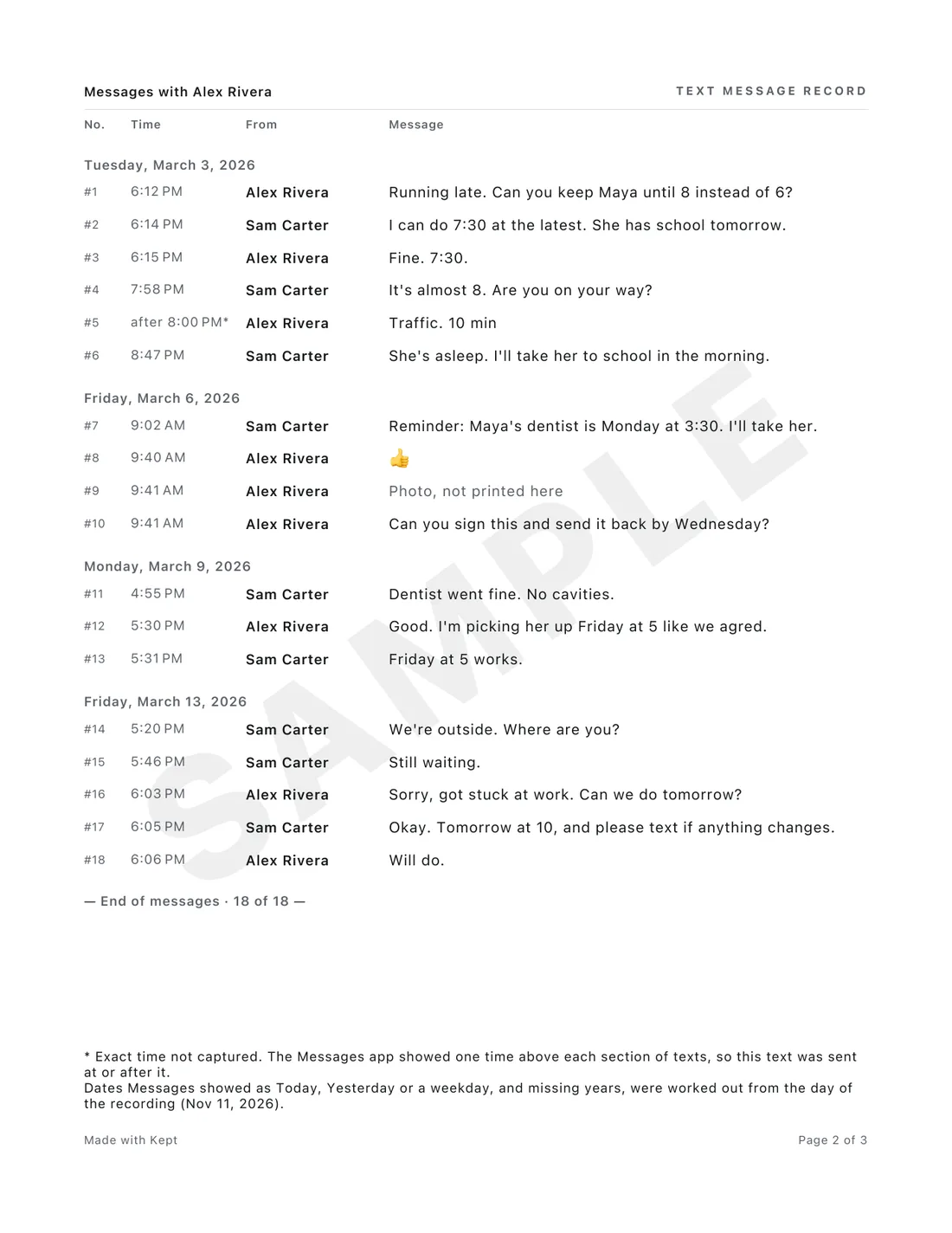
What the printout should show
- Both people's names and phone numbers, not only a contact name.
- A date and time on every text.
- Both sides, in order, with nothing cropped out.
- Numbered texts and pages, so anyone can point to one.
- Where the record came from, and anything you changed.
- Pages that stay readable when they're photocopied.
How to do it on an iPhone
- Open Kept Texts and tap Make a Record, then Messages. The first time, tap Add Kept's Shortcut and add it in Apple's Shortcuts app; you only do this once. Then tap Choose a Chat, pick the conversation in Shortcuts, and choose Always Allow when Apple asks (a few times, the first run). Shortcuts hands over every text with its exact words and time, and Kept Texts keeps only the chat you picked.
- On your PDF, tap Edit to check both names and add phone numbers. The PDF says which ones came from Messages and which you typed.
- Check anything Kept Texts marked, then preview the whole PDF for free.
- Save, print or share it with a pass. Print sends it straight to a printer.
What's in the PDF
A cover with who's in it, the dates it covers and where it came from. Then every text, numbered, with its sender and time. At the end, a list of every fix you made, and a fingerprint page: a code worked out from what the record was made from, before you changed anything. For a recording, screenshots or a WhatsApp file, anyone with a copy of it can check it's the same file.
Before you hand it in
- Don't delete the conversation, and keep the phone. Someone may ask to see the original.
- A full thread for the dates that matter is harder to question than cropped screenshots.
- Every court has its own rules, so ask your lawyer or the court clerk how they want texts. Kept Texts doesn't certify records, and this isn't legal advice.
Questions
Can I print text messages for court without a computer?
Yes. Kept Texts makes the PDF on your iPhone. Print it from the app with AirPrint, or send the PDF to your lawyer or a print shop.
Will the court accept it?
Every court has its own rules, so ask your lawyer or the court clerk how they want texts. Kept Texts doesn't certify records, and this isn't legal advice.
Do I need to take screenshots first?
No. Through Kept Texts' shortcut, Apple's Shortcuts app hands over the chat from Messages. If you already took screenshots, Kept Texts can turn those into the PDF too.
See what you'll get
Kept Texts is coming soon to the App Store, for iPhone with iOS 26 or later. It's free to make, check and preview your whole PDF. A pass to save, print and share costs $9.99 for 30 days or $29.99 for a year, and never renews.
More guides
- How to Get Text Messages Ready for a Custody Case
- How to Print Text Messages With the Date and Time
- What to Look for in an App to Export Texts for Court
Updated November 13, 2026.